Why Support Removal Is a Skill Worth Learning
Most FDM and resin prints need supports. Overhangs past 45°, tall narrow features, and bridging all need support to print successfully. But removing those supports cleanly — without scarring the model or breaking delicate features — is what separates a finished print from a damaged one.
The right tool and technique make a big difference. Pulling supports with your fingers works for chunky tree supports on PLA, but it leaves messy stubs and risks breaking small details. A dedicated support removal tool gives you control and a clean cut every time.
Pick the Right Tool for the Job
A good support removal tool has a sharp, narrow blade for getting into tight gaps, a flush edge for cutting flush with the model surface, and a comfortable handle for the dozens of small cuts a typical support structure requires.
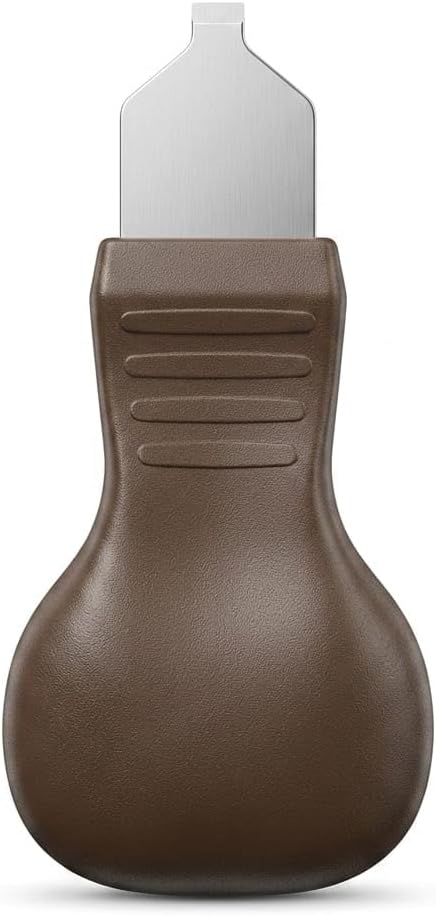
The Proevove support removal tool kit is a precision cutter designed for this job. The stainless steel blade is sharp enough to slice through FDM support material cleanly, and the acrylic handle gives you the grip and visibility you need for detailed cleanup work.
- Sharp, narrow blade for tight gaps.
- Flush-cutting edge for clean cuts at the model surface.
- Comfortable handle for repetitive cuts.
- Works on PLA, ABS, PETG, TPU, and UV resin.
Technique: Where to Grip, Where to Pull
Always cut supports, do not twist or yank them. Twisting tears the support interface and leaves a rough scar on the model. Cut close to the model surface, then use the blade to trim any remaining stub flush with the surface.
Hold the model firmly with one hand — fingers away from the cutting line — and cut with the other. For very small features, rest the model on a soft cloth or pad so you can see the cutting line clearly. A few seconds of setup prevents minutes of cleanup later.
- Cut, do not twist or yank.
- Cut close to the model surface and trim the stub flush.
- Hold the model firmly, fingers clear of the cutting line.
- Rest small parts on a soft cloth for better visibility.
Support Removal for FDM Prints (PLA, ABS, PETG)
PLA is the easiest to clean up. Tree supports and standard supports both pop off cleanly, and small stubs sand away in seconds. The Proevove support removal tool cuts PLA supports with very little force, leaving the model surface intact.
ABS and PETG supports are tougher and more likely to leave a scar. Cut as close to the surface as you can, then use a brief pass with a hobby knife or sandpaper to clean up the remaining stub. For PETG, a heat gun on low can soften the support interface and make removal cleaner — but test on a scrap first.
- PLA: easy cleanup, supports pop off cleanly.
- ABS: tougher, cut close and sand the stub.
- PETG: tough and stringy, use a low heat gun with care.
- Always cut close to the model surface for best results.
Support Removal for Resin Prints
Resin supports are thin and brittle. They cut cleanly with a sharp blade but tend to snap rather than flex, so a careful cut is essential. Cut close to the model surface and let the blade do the work — twisting leaves a sharp divot in the cured resin.
After cutting supports, the model still has a thin layer of uncured resin on the surface. Cure the print under UV light (sunlight works, a UV cure station is faster) before final cleanup. Once fully cured, the surface is hard and you can sand or polish away any remaining support marks.
- Resin supports snap rather than flex — cut, do not twist.
- Cut close to the model surface to minimize the divot.
- Cure the print under UV before final cleanup.
- Sand and polish support marks after curing.
Common Mistakes That Damage Models
Twisting or yanking supports is the most common cause of broken features. A clean cut is faster and safer than trying to rip a stubborn support off. If a support does not cut easily, the blade is probably dull or the cut is not close enough to the surface — reposition and try again.
The second common mistake is cutting toward your fingers or the model. Always orient the cut so the blade moves away from important features and away from your supporting hand. A few seconds of thought about cutting direction prevents a ruined print or a cut finger.
- Twisting and yanking breaks features and leaves scars.
- Cut away from important features and your supporting hand.
- Reposition if a cut does not go through cleanly.
- Practice on a scrap print to get the feel of the tool.
Proevove Support Removal Tool Kit
The Proevove support removal tool kit is a precision cutter with a stainless steel blade and an acrylic handle, sized for the kind of detailed cleanup work that FDM and resin prints require. It works on PLA, ABS, PETG, TPU, and UV resin, and the compact 10×5 cm size fits in a printer-side drawer or toolkit.
The kit is available on Amazon India. If you are unsure how to handle a specific support structure on a specific material, send us a photo on WhatsApp — we are happy to suggest the best approach.